

Hrly OS logo

Automate your hourly invoicing.

Hrly OS is a premium, single-tenant operating system that tracks your time, enforces budget limits, and seamlessly bills your clients via Stripe.

Own it for a one-time $6,999, or go Managed from $100/month. See pricing

Hrly OS live demo — AI-powered work report creation, task review tabs, and a structured task table showing billable hours per client and project.

Stop feeding the machine.

Between freelancing platform "taxes" and the DIY administrative trap, you're losing thousands in revenue and an entire week of production every single month.

The Marketplace Tax

Successful freelancers on marketplaces are losing $10,000+ per year in platform fees, while clients are also hit with hidden marketplace fees.

  • Service Fees — Standard 10% commission rate: -$951
  • Subscription Fees — Monthly platform premium costs: -$1,200
  • Withdrawal Fees — Fixed bank rate: -$450
  • Hidden Fees — That 20% cut on tips: -$100

The DIY Admin Trap

Independent contractors with direct contracts spend 20 to 40 hours a month on manual spreadsheets, tracking hours, and issuing Stripe invoices.

Stripe

What is Hrly OS?

Hrly OS is a smart billing and customer portal designed to eliminate admin work from your digital hourly service operations. It's an online mini hourly service marketplace of your own.

  • Full Ownership

    A private instance wired to your own Stripe and database. Own it outright or let us manage it.

  • AI Task Logging

    Chaotic daily updates into organized task reports and calculated hours with AI.

  • Stripe Billing

    Sync usage to Stripe for financial processing, global compliance, and advanced reporting.

  • Client Dashboard

    Dashboards for real-time project tracking, management, and task visibility.

How does Hrly OS work?

Customer Dashboard

  1. Customers subscribe to your hourly service
  2. They get access to their dashboard; manage projects and usage limits
  3. Get automated usage reports and invoices via email

SP Dashboard

  1. You and your team submit work reports on active projects
  2. You and other managers review and approve work reports
  3. The software records usage to associated Stripe subscriptions
  4. Stripe issues invoices to your customers
  1. Customers subscribe to your hourly service

  2. They get access to their dashboard; manage projects and usage limits

  3. Get automated usage reports and invoices via email

Your SP dashboard

You as the Service Provider (SP), get a dashboard where you can work as a solo practitioner, or build an agency with as many users as you want.

A portal your customers will actually use.

Replace chaotic email threads with a sleek, white-labeled dashboard where your customers can manage limits, track progress, and see exactly what you've waived.

01

Quick Onboarding

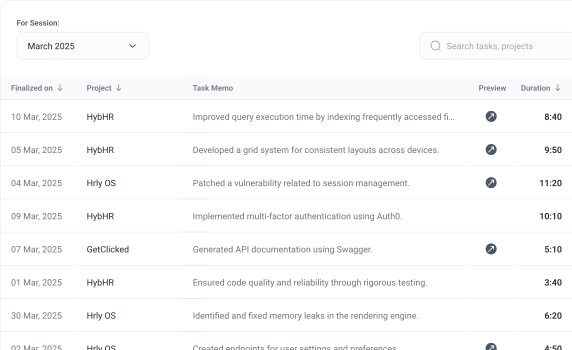
Provide your clients with 24/7 access to a premium, white-labeled dashboard to view active projects, finalized work reports, and real-time upcoming invoice overview. This transparency reduces the need for constant status emails and fosters trust through operational honesty.

02

Spending Limits

Empower your clients with granular financial control by letting them manage and upgrade their monthly usage limits directly from their portal. Hrly OS enforces these quotas at both the global workspace and individual project levels, preventing overages and ensuring billing expectations are met.

03

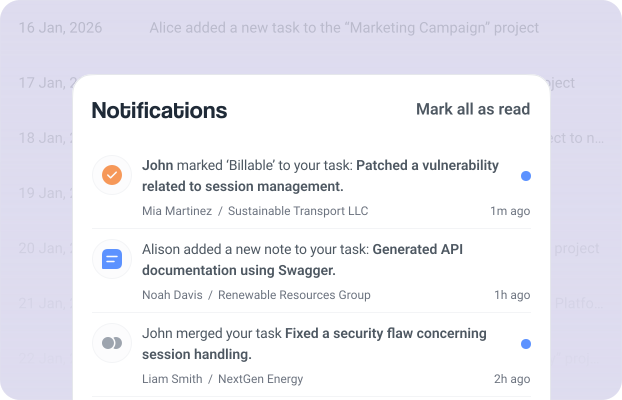
The "Activity Log" and Notifications

Want to keep track of the activities of your team member or your customer? The software keeps log of the in-app activities and sends you notifications right away.

04

Real-Time Transparency

Provide your clients with 24/7 access to a premium, white-labeled dashboard to view active projects, finalized work reports, and real-time upcoming invoice overview. This transparency reduces the need for constant status emails and fosters trust through operational honesty.

BiTechX agency office scene showing a team of developers and designers working at their desks, with project boards and debug screens in the background.

We didn't just build it; we run our agency on it.

Book a demo call

Since February 1, 2026, BiTechX has utilized Hrly OS to manage all internal and client-facing hourly services. By replacing manual administrative work with our automated pipeline, we have saved significant resources and perfected the software through real-world feedback.

A year of product work. Live in a week.

Hrly OS took our team more than a year of research, design, engineering, testing and iteration. You can run it under your own brand in as little as one week. With Own It, all that work becomes software your business owns outright, an asset instead of a rental.

How long it took us

12+ months, now in daily use since Feb 2026
  1. Research
  2. Branding
  3. Product design
  4. Engineering
  5. Testing
  6. Iteration

How long it takes you

As little as 1 week, on either plan
  1. Kickoff
  2. Accounts connected
  3. Branded and configured
  4. Tested
  5. Live

Built by people. Not vibe coded.

Billing software handles your revenue and your clients' trust. Experienced designers and engineers were in the driving seat for every part of Hrly OS.

  • Designed by product designers

    The brand, the user experience and every screen were designed hands-on by senior product designers, starting from research, not a prompt.

  • Engineered by experienced engineers

    Billing logic, Stripe metering, permissions and data isolation were written and reviewed line by line by engineers who own the code.

  • Tested on real invoices

    We've billed our own clients through Hrly OS since February 2026, so every release is proven on real projects and real money.

Own it, or let us run it.

Buy Hrly OS once and keep it for good, or start on a managed monthly plan. Either way it's your own private instance, and client payments go straight to your Stripe.

One-time purchase

Own It

Buy once. Run it as yours, forever.

$6,999one timeNo subscription. No per-user fees.
  • An asset, not a rental: your own branded software, live in as little as 1 week
  • Lifetime license, installed on accounts you own
  • Unlimited team members and clients
  • Optional: custom development to shape it around your business
  • Optional: support and maintenance by monthly retainer or hourly

You also pay your own Vercel hosting, Supabase, Stripe and API usage, billed by each provider.

Book a Discovery Call
Compare both plans
Hrly OS plan comparison: Own It versus Managed
PriceOwn It$6,999 onceManaged$500 setup, then $100/month per 10 users
UsersOwn ItUnlimitedManagedPacks of 10 (team + client logins)
App hosting (Vercel)Own ItYour Vercel accountManagedOur Vercel account, included
Database and loginsOwn ItYour Supabase accountManagedYour Supabase account
Client paymentsOwn ItStraight to your StripeManagedStraight to your Stripe
Updates and supportOwn ItOn demand, by retainer or hourlyManagedIncluded
Custom featuresOwn ItAvailable as an add-onManagedStandard features only
LicenseOwn ItLifetime, for your businessManagedActive while subscribed

Your money and data stay yours.

Every customer gets a private, single-tenant instance wired to accounts in their own name. Switch plans to see what changes.

Your accounts

In your name, billed to you
VercelApp hosting on your account
StripeClient payments and invoices
SupabaseDatabase and user logins
Email and AI APIsYour keys, your usage

BiTechX

Never in the money path
Support on requestRetainer or hourly, when you need us
Your clientpays an invoice
Your Stripeprocesses it
Your bankreceives payouts
BiTechX never processes, holds or takes a cut of your revenue.

Own It: Vercel hosting, Stripe, Supabase and your APIs all run on accounts in your name.

When does owning pay off?

Compare software fees over time. Stripe, database and API costs are yours on both plans, so they're left out, along with your Vercel hosting on Own It.

3 packs of 10 on Managed, $300 a month
Try a setup

Owning pays for itself in month 22.

Over 3 years, you'd keep $4,301 by owning instead.

Own It$6,999
Managed$11,300

Software fees only. Own It doesn't include ongoing support or maintenance; add it by retainer or hourly if you need it.

Frequently asked questions

Everything about Hrly OS, from how billing works to who owns your data.

What is Hrly OS?

Hrly OS (pronounced "hourly OS") is white-label billing software and a client portal for businesses that sell services by the hour. Your team logs work reports, managers approve them, and Hrly OS records the approved hours to your own Stripe account, which invoices your clients automatically.

Who is Hrly OS for?

Hrly OS is built for freelancers, consultants, studios and agencies that bill clients by the hour or on retainers. It suits solo professionals as well as teams with many contractors, especially those moving direct clients off freelance marketplaces.

How is Hrly OS different from freelance marketplaces?

Marketplaces take a commission on every invoice and own the client relationship. With Hrly OS, clients pay you directly through your own Stripe account, the portal carries your brand, and no platform fee is taken from your revenue.

How is Hrly OS different from a time tracker?

A standalone time tracker records hours. Hrly OS runs the whole billing loop: AI-assisted work reports, manager approval, a white-label client portal with spending limits, usage billing through Stripe and an activity log, all on infrastructure that belongs to you.

How does AI task logging work?

You paste or type your raw daily notes, and Hrly OS drafts structured task reports from them: it splits work into tasks, estimates time spent, applies your rounding rules and matches each task to a client project. Nothing is billed until a person reviews and approves the report.

Which billing models does Hrly OS support?

Hrly OS is configured to match how you already charge, including simple hourly billing, monthly retainers and tiered pricing. Approved hours are recorded to the matching Stripe subscription, and Stripe generates the invoices every billing cycle.

How does the usage-based billing cycle work?

Every client subscription in Hrly OS, whether it's pay-per-hour, a retainer or another model, runs on a monthly cycle from the 1st of one month to the 1st of the next. Approved usage within that period is recorded to the client's Stripe subscription and invoiced at the end of the cycle. If you need a different cycle, such as weekly or one tied to each client's start date, that's available through custom development on the Own It plan.

Can my clients control how much they spend?

Yes. Clients can set and upgrade monthly usage limits from their own portal, and Hrly OS enforces those limits at both the workspace and the individual project level, so billing never runs past what a client agreed to.

Ready to Completely own your agency's operations?

Don't let another billing cycle pass relying on marketplace fees or duct-taped spreadsheets.

Fill in this form to get started!

You will receive an invitation for a discovery call directly in your email.

You can unsubscribe at any time by clicking the unsubscribe link in our emails or replying "STOP" to our texts.

Your information is safe with us and will only be used in accordance with our Privacy Policy.